


Mautic Deployment and Setup Service
Mautic is one of the most powerful open source marketing automation platforms used by companies that want full control over their data marketing workflows and email campaigns. With this Mautic deployment service you can launch a production ready Mautic instance without spending days on server configuration troubleshooting or manual setup.
This service is designed for businesses marketers and agencies that need a reliable self hosted marketing automation tool running on their own infrastructure.
What is Mautic and why companies choose it
Mautic is an open source marketing automation platform used worldwide for email marketing lead generation customer segmentation and automated campaigns. Unlike SaaS tools Mautic runs on your own server which means full ownership of customer data better GDPR compliance and no monthly license fees.
Companies use Mautic to build advanced marketing funnels automate email sequences manage leads and connect marketing activity with CRM and sales systems.
What is included in this Mautic deployment
This deployment provides a ready to use Mautic installation configured for real world usage. The stack includes the application database web server background tasks and required services to ensure stable operation.
The deployment handles server setup database configuration cron jobs email processing and core optimizations so Mautic works as expected from day one.
You get a clean installation that can be easily extended with plugins integrations and custom workflows.
Who this service is for
This service is ideal for
Marketing teams launching self hosted email automation
SaaS companies managing lead nurturing and onboarding
Agencies deploying Mautic for multiple clients
Businesses migrating from Mailchimp ActiveCampaign or HubSpot
Companies that need GDPR compliant marketing automation
If you want marketing automation without vendor lock in this deployment is the fastest way to start.
Why automated deployment matters
Manual Mautic installation often leads to problems with cron jobs email queues performance and updates. An automated deployment removes these risks and ensures consistent predictable results.
A correctly deployed Mautic instance improves email deliverability campaign reliability and long term maintainability.
Scalable and ready for growth
This setup can be used for small teams and scaled later as traffic campaigns and contact lists grow. You can integrate SMTP providers CRMs analytics tools and custom applications through the Mautic API.
The deployment is suitable for VPS cloud servers and dedicated environments.
Why choose this Mautic deployment service
Fast setup without manual configuration
Production ready environment
Full control over your marketing data
No recurring license fees
Compatible with modern marketing stacks
Launch your Mautic platform faster reduce technical risks and focus on building campaigns that convert.
What does Mautic Formula stack include
- Mautic marketing platform
- WordPress and Mautic Integration Plugin
- SuiteCRM with Mautic Connector and optional mailing system based on Dovecot, Postfix
- Other useful tools
The stack is built using Docker Compose and consists of the following:
- Mautic docker container
- Wordpress docker container
- SuiteCRM docker container
- Nginx docker container
- MySQL docker container
- Redis docker container
- RabbitMQ docker container
Docker images are constantly updated using our automated build system and tested
Extensions and plugins
- Mautic Integration Plugin for WordPress
- Mautic Connector for SuiteCRM
- Dovecot and Postfix based optional mailing system
Configuration settings
Once the deployment is complete, you will receive an email with all the configuration settings required for post-installation steps. Be attentive when you fill-up the server hostnames. See some examples below:
SMTP Host: smtp
SMTP Port: 25
MYSQL
MYSQL_HOST:     mauticdb
MYSQL_USER:     mautic
MYSQL_DATABASE: mautic
MYSQL_PASSWORD: <find in e-mail>
MEMCACHED
MEMCACHED_HOST: memcached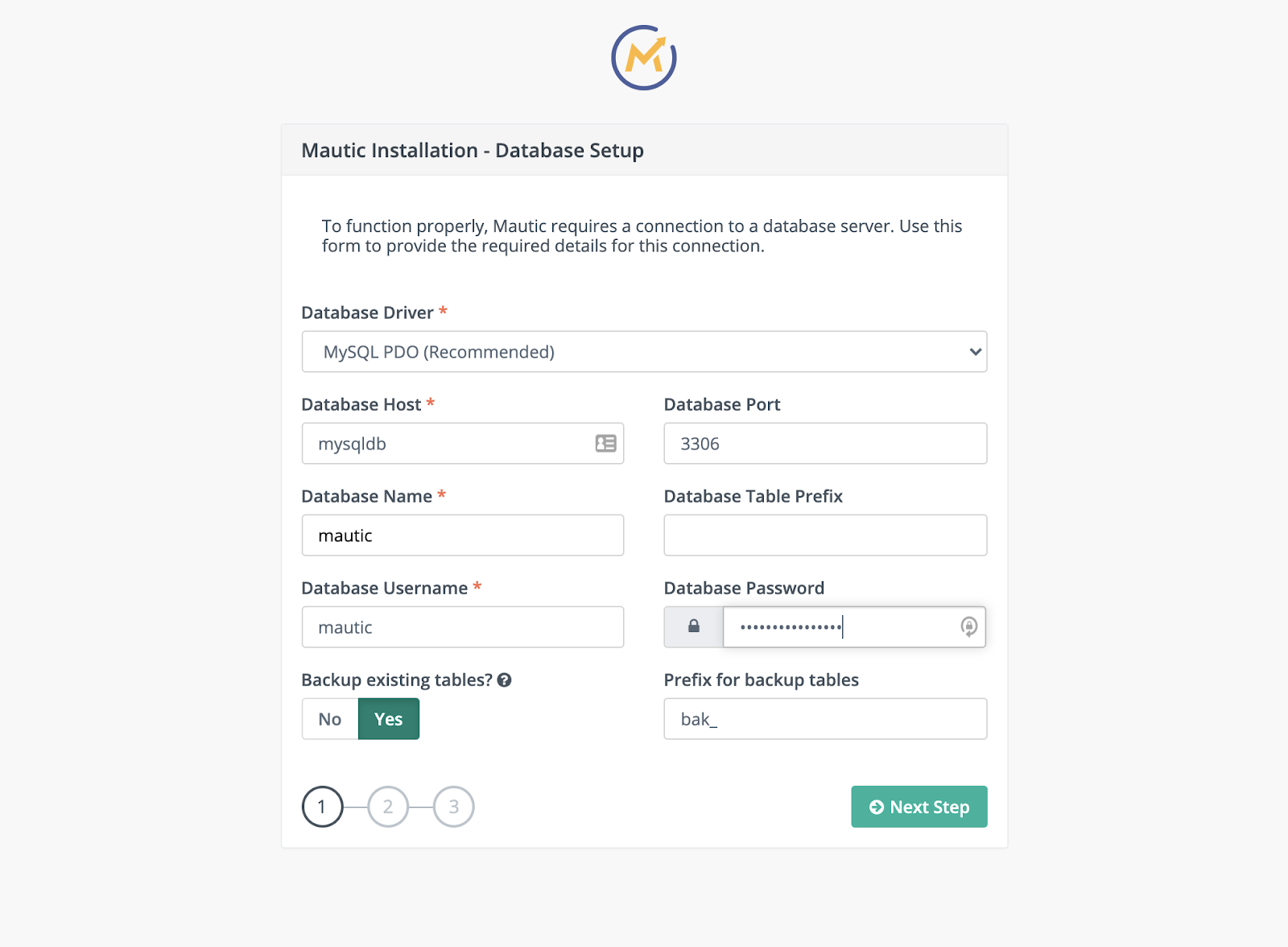
Mautic Installation - Database setup
Number of servers required:
1 VPS, or cloud server
Companion apps

Fail2ban scans log files and bans IPs that show the malicious signs. Highly recommended for simple VPS server setup

Get the easiest way to manage your MySQL server by including phpMyAdmin within the current deployment. Easily pause or stop phpMyAdmin container later.

Nginx Proxy Manager is a user-friendly software application designed to effortlessly route traffic to your websites, whether they're hosted at home or elsewhere. It comes equipped with free SSL capabilities, eliminating the need for extensive Nginx or Letsencrypt knowledge. This tool proves especially handy for simplifying SSL generation and seamlessly proxying your docker containers.

Get DevOps Support Hourly
By selecting this service, you will have priority access to the development team for optimizing and upgrading your stack.
Contact info@try.direct for more information or Hire an expert directly to make post-installation adjustments on an hourly basis. Browse other available services.

Monitors health, collects metrics, manages Docker containers, and executes commands — all from a single statically-linked binary.

Portainer is a lightweight management UI that allows you to easily manage your different Docker environments (Docker hosts or Swarm clusters)